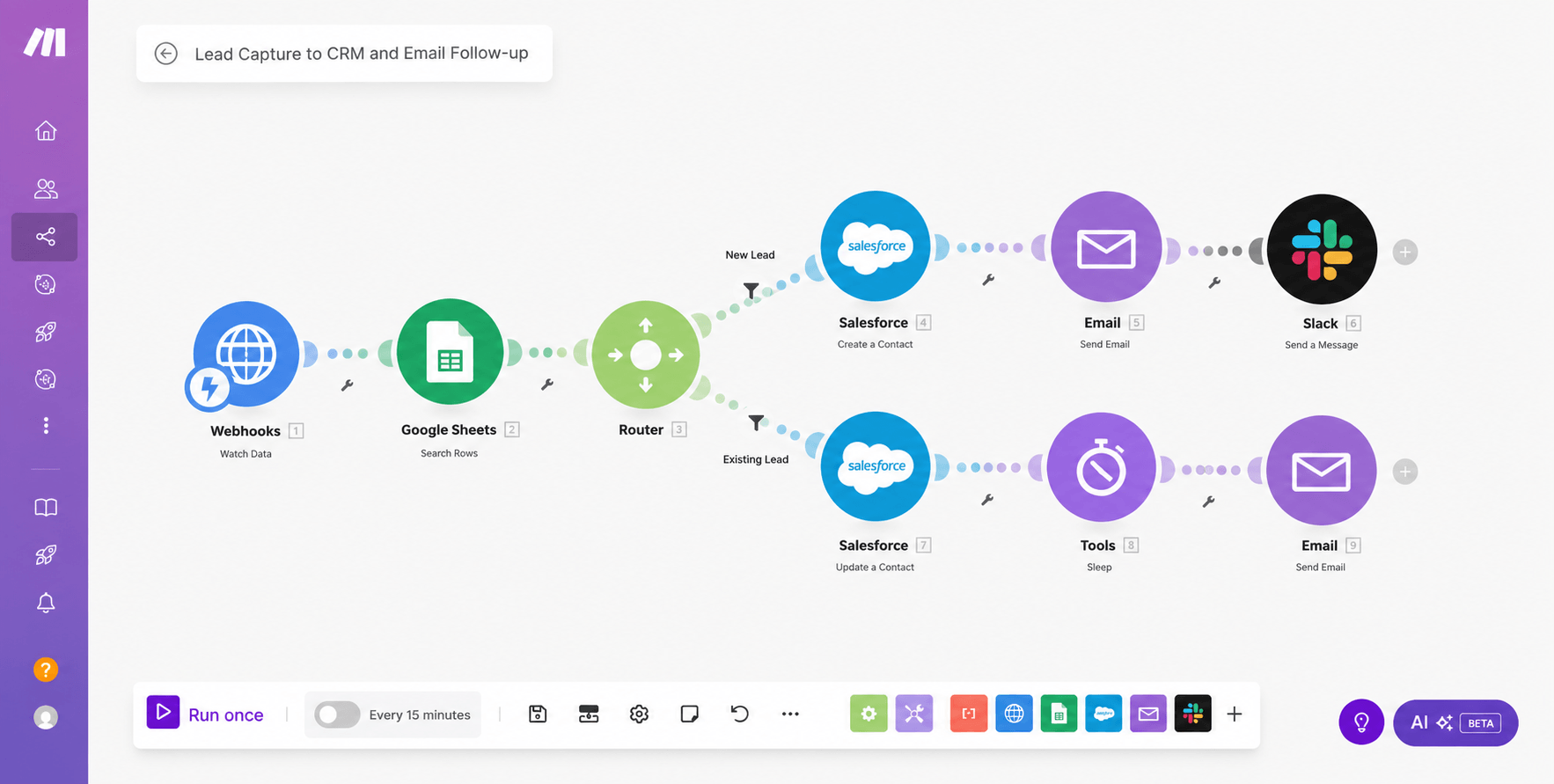
Every inbound lead is checked against the existing record before anything is written. New people are created in Salesforce, emailed and announced in Slack. People already known are updated in place, then followed up after a deliberate delay.
Results at a Glance
Most lead automations create a record on every submission. Two months later the same person exists four times, the reporting is wrong, and somebody is emailing a customer as though they were a stranger.
This scenario looks before it writes. A lookup against the existing sheet decides which of two paths the lead takes, and only one of them creates anything.
Deciding new from existing is the easy part. The harder part is that the two paths need different behaviour afterwards: a new lead should be announced to the team, and a returning one should not, or the channel becomes noise nobody reads.
Duplicates corrupt the reporting
One person as four records makes every pipeline number wrong and every follow-up awkward.
Notify everything and nobody looks
Slack alerts only earn attention if they are reserved for genuinely new leads.
An instant follow-up reads as a bot
A deliberate delay before the second email makes the sequence feel considered.
Two paths, one entry point
The decision has to happen once, early, so nothing downstream needs to re-check it.
The challenge was real, and it was costing time, money, and client experience.
A webhook receives the submission and a Google Sheets lookup checks whether the person is already known. A router then splits on that answer.
New leads are created as Salesforce contacts, sent a personalised email and announced in Slack so the team sees them arrive. Existing contacts are updated in place, then held briefly before a follow-up email, so an update does not read as a fresh pitch.
The solution was designed from the ground up to fit this exact business.
A webhook takes the submission from whatever form or page produced it.
A Google Sheets search decides whether this person is already known.
A router sends new and existing leads down separate branches.
Salesforce write, personalised email, and Slack only for genuinely new leads.
Each tool chosen specifically for reliability, integration depth, and ease of use for the client.
Scenario, router and delays.
Contact create and update.
The lookup that prevents duplicates.
New-lead announcements only.
One record per person, and notifications only where they are useful.
Runs before any write, so the CRM stays clean.
New leads announced, returning ones updated quietly.
A pause before follow-up so it does not read as automated.
Send me the brief, a Figma file, a reference site or a rough outline, and you'll have a fixed quote with a delivery date within 24 hours.