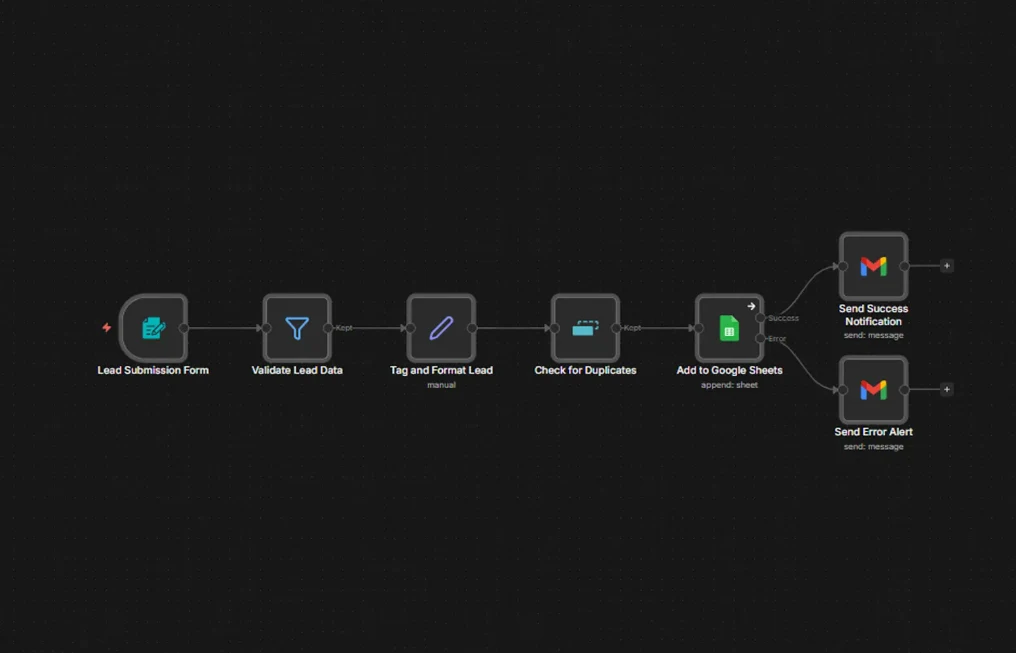
A form submission is validated, tagged into a consistent shape and checked against existing entries before it is written. Whether the write succeeds or fails, somebody is told.
Results at a Glance
Intake automations usually report success and say nothing when they fail, which means a broken sheet connection or a malformed submission can lose leads for days before anyone notices.
Here the write has two outcomes and both of them send mail. Success confirms; failure alerts. There is no path that ends in silence.
Validation, tagging and duplicate checking each have to happen before the write, in that order, because a duplicate check on unformatted data will not match and a tag applied to invalid data just makes the mess consistent.
Silent failure loses leads
A broken connection can drop submissions for days if nothing reports the failure.
Order of operations matters
Formatting has to happen before the duplicate check, or near-matches slip through as new.
Duplicates start on day one
One person filling the form twice should not become two leads for someone to reconcile later.
Success deserves a receipt
Confirming the good path is what makes the alert on the bad path meaningful.
The challenge was real, and it was costing time, money, and client experience.
The form submission is validated first, so incomplete entries stop before they reach anything else. Valid leads are then tagged and formatted into a consistent shape, which is what makes the following duplicate check reliable.
Only then is the lead appended to Google Sheets. The write node branches on its own outcome: success sends a confirmation, failure sends an alert naming what went wrong.
The solution was designed from the ground up to fit this exact business.
Incomplete submissions stop here rather than partway through the pipeline.
Everything is normalised into one shape, which is what makes the next step work.
Existing entries are matched before anything is appended.
Success and failure each send their own email.
Each tool chosen specifically for reliability, integration depth, and ease of use for the client.
Validation, formatting and branching.
The lead record.
Success confirmations and error alerts.
Clean, deduplicated leads in the sheet, and a message either way.
Validate, format, then match against what already exists.
A confirmation, so the good path is visible too.
An alert naming what went wrong, rather than silence.
Send me the brief, a Figma file, a reference site or a rough outline, and you'll have a fixed quote with a delivery date within 24 hours.